- Telefon: +60 12 809 1368
- E-mel:


Be updated, subscribe to the OpenKM news
Document Management for Windows and Microsoft Office: How to Manage Large Repositories with OpenKM Without Sacrificing Performance
Written by OpenKM on 16 october 2026
The Challenge of Managing Large Document Repositories in Windows
As businesses accumulate thousands of documents, file management in Windows environments can become a challenge. Overloaded file servers, shared folders containing large volumes of information, and traditional navigation systems can slow down document searches and selection, affecting user productivity.
As repositories grow, navigating entire folder structures to locate a file can lead to long wait times and unnecessary resource consumption. That is why organizations need a document management system for Windows that can handle large document repositories efficiently.
To address this need, OpenKM 8.2.9 introduces a major update to its Windows desktop applications. The update covers Microsoft Office add-ins and tools such as BulkUploader, DigitalSignatureClient, DownloadTool, HotFolder, OKMPrinter, OKMEncryption, ScanStation, and LiveEdit.
The goal is to provide a more modern experience, reduce wait times, and make it easier to work with large document libraries.
One of the most significant changes concerns the selection of folders, documents, and records. Previously, applications used a navigation tree that required all items in a folder to be retrieved in a single request. This was not a problem in small repositories, but it could become inefficient as the number of documents and folders increased.
With OpenKM 8.2.9, this navigation model has been redesigned to speed up access to information and improve system performance.
Paginated Navigation: Find Files Faster
The previous node-tree selector has been replaced with new navigation, search, and document-selection dialogs that load only the information needed at any given moment.
Instead of retrieving every item in a folder, applications now use paginated navigation and on-demand loading, making it more efficient to work with large repositories.
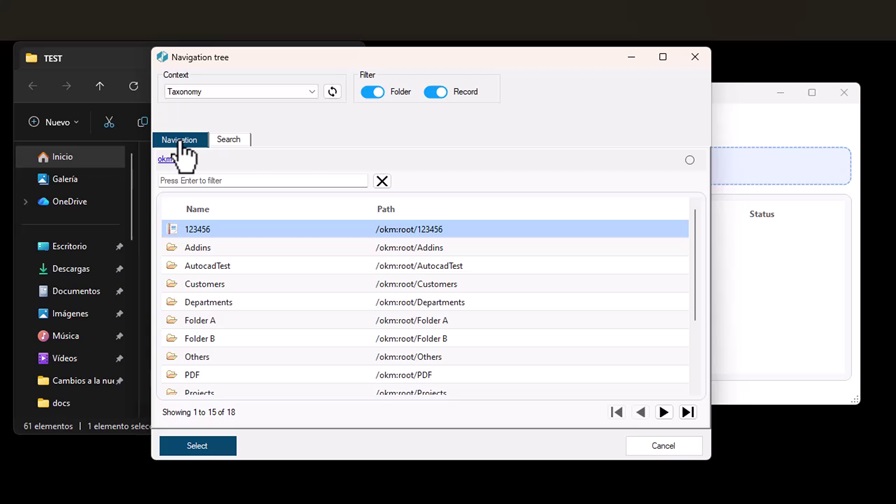
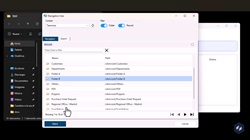
OpenKM 8.2.9’s new paginated navigation system, featuring search, filters, and on-demand loading.
The new explorer includes two main areas:
- Browse tab: lets users move through the repository one level at a time and uses breadcrumbs to show their current location clearly.
- Search tab: lets users locate a folder, document, or record directly by entering its name, without having to navigate the entire structure manually.
Pagination controls have also been added to move to the first, previous, next, or last page, along with a counter showing the displayed items and total number of pages.
Users can also filter by content type and text to find the information they need more quickly.
The main benefit is that each request retrieves only the items on the page currently being viewed. This reduces the amount of data transferred and the memory needed to display large document structures.
In internal development tests, the paginated query system delivered navigation performance improvements of 5 to 7 times compared with the previous system.
These figures come from internal tests rather than standardized benchmarks, but they illustrate the potential impact of this approach on large repositories.
Is your company’s Windows file server running slowly?Discover how OpenKM can help you centralize documents and speed up information access with a document management system designed to handle large volumes of files.
Request an OpenKM Demo
A More Modern, Consistent Windows Interface
The improvements in OpenKM 8.2.9 go beyond performance. The desktop applications have also been visually redesigned, moving away from the traditional WinForms appearance.
The new interface features refreshed buttons, tables, controls, and visual indicators, as well as color-coded statuses that make operations easier to monitor.
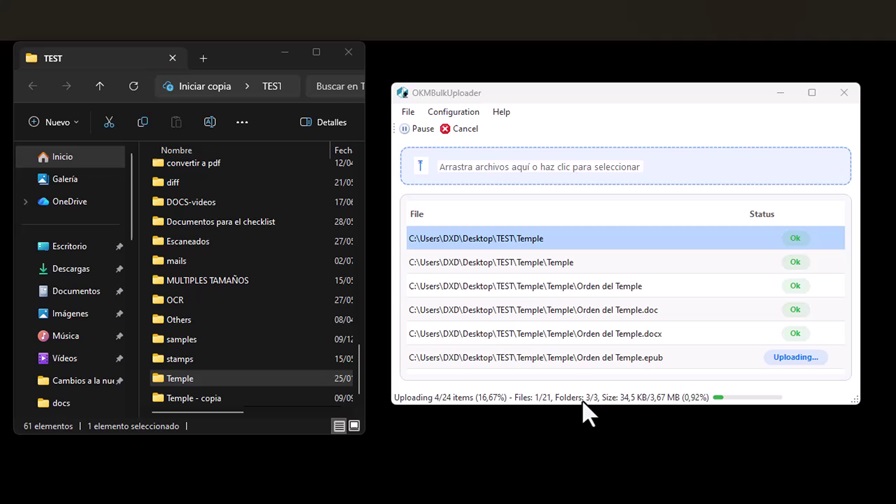
The new BulkUploader interface in OpenKM 8.2.9.
This update also aims to create a more consistent user experience across the various OpenKM tools for Windows.
Another improvement is interface localization. Confirmation messages such as “OK,” “Yes,” and “No” now appear in the language selected within the application, rather than relying on the language configured in Windows.
As a result, users benefit from a more consistent, understandable interface adapted to their preferences.
A Document Management System Fully Integrated with Microsoft Office
Document management integration with Microsoft Office is one of the highlights of OpenKM 8.2.9.
The add-ins let users work with information stored in OpenKM directly from familiar office applications, making it easier to view and manage documents without leaving their usual tools.
The new release includes specific enhancements for Word, Excel, PowerPoint, and Outlook, strengthening the integration between the document management system and the Microsoft ecosystem.
Improvements to Our Document Management Integration with Microsoft Word, Excel, and PowerPoint
The Microsoft Office add-ins include some of the most important enhancements in OpenKM 8.2.9.
One key change is that Excel and PowerPoint now offer the properties panel previously available only in Word.
This panel lets users view and manage information related to documents stored in OpenKM directly, improving integration with Microsoft Office applications.
The interface for categories, keywords, relationships, and metadata sections has also been redesigned to make it easier to use.
Another notable enhancement is the introduction of a new HTML notes editor.
Previously, notes were written in plain text. Users now have formatting tools that help them structure their content and present information more clearly.
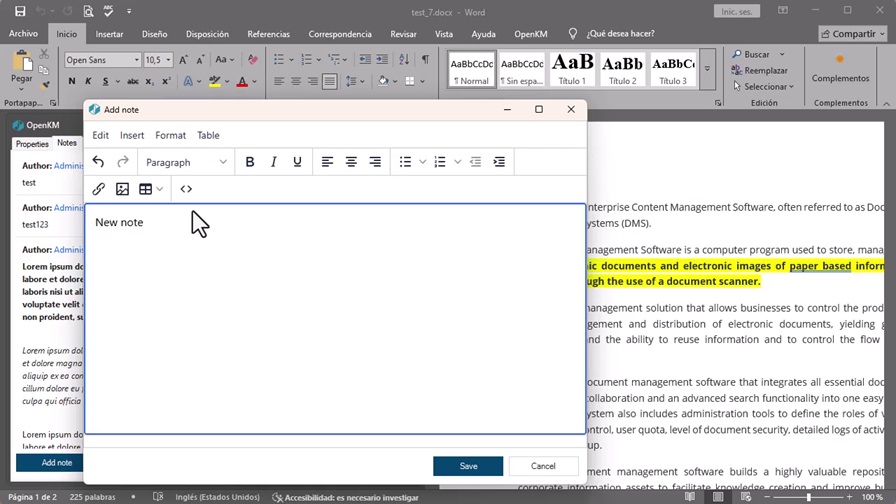
The new HTML notes editor in the OpenKM add-in for Microsoft Word.
In addition, the Word, Excel, and PowerPoint add-ins now support matrix-type metadata, making it easier to work with more complex information structures directly from Office applications.
The add-in startup process has also been optimized. Sign-in and the initial telemetry check no longer block the main UI thread, preventing the panel from becoming unresponsive while a connection is established.
Finally, a race condition that could prevent the Categories tab from loading correctly in Excel or PowerPoint has been fixed.
Together, these improvements create a smoother experience when working with documents and metadata from Microsoft Office.
The Outlook Add-in Becomes Faster with Paginated Navigation
The integration between OpenKM and Outlook also benefits from the new navigation system.
The add-in panel used to drag and drop emails directly into OpenKM no longer displays the repository’s entire folder tree.
Instead, it uses the new paginated navigation and search system, making it easier to select where each email should be stored.
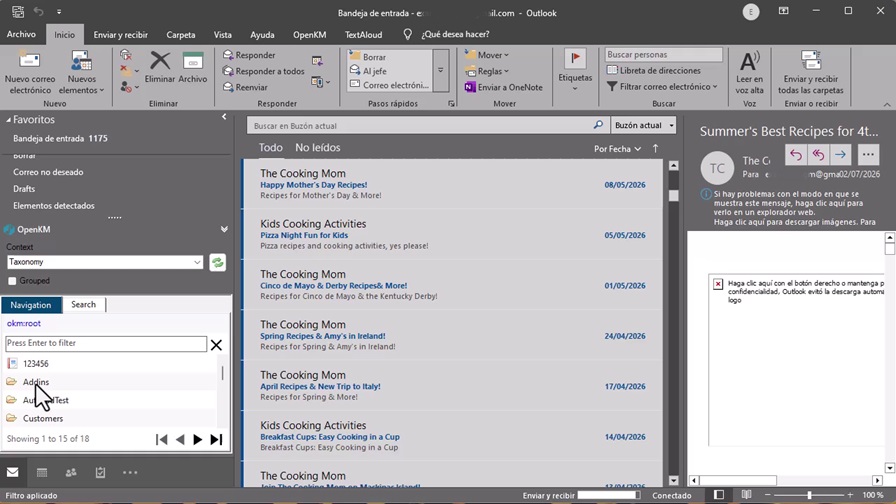
The Outlook add-in replaces the old folder tree with paginated navigation and search.
For organizations handling large volumes of documents and email, this improvement significantly simplifies folder selection.
Users can move between levels or search directly for their destination without scrolling through extensive directory trees.
This makes saving emails in the document management system easier and faster, especially in repositories containing thousands of folders and documents.
DownloadTool, ScanStation, and Other Applications: Improvements Across the OpenKM Ecosystem
Beyond the changes to Microsoft Office and Outlook, OpenKM 8.2.9 includes improvements to other desktop applications, enhancing consistency and performance across the toolset.
DownloadTool: Clearer, More Controlled Downloads
DownloadTool now includes a preliminary scan that lets users find out how much information will be downloaded before the process begins.
The application displays the estimated volume in megabytes, providing greater visibility into download size.
This improvement makes it easier to plan operations, particularly when working with large document repositories.
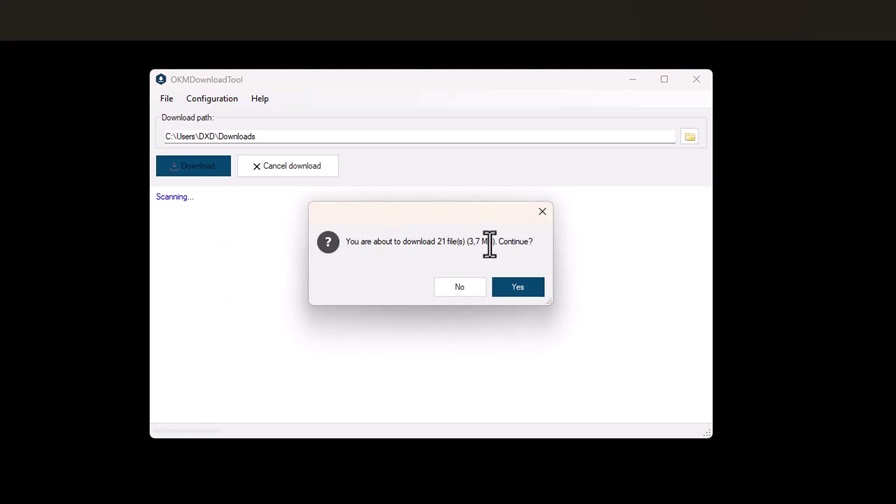
DownloadTool lets users check the amount of information to be downloaded in advance.
ScanStation: Better Status Visibility and New Metadata Support
ScanStation retains its familiar workflow while introducing improvements that make scanned documents easier to manage.
It now displays the status of scanned documents and supports matrix-type metadata.
These changes provide greater visibility into the scanning process and expand the options for classifying information.
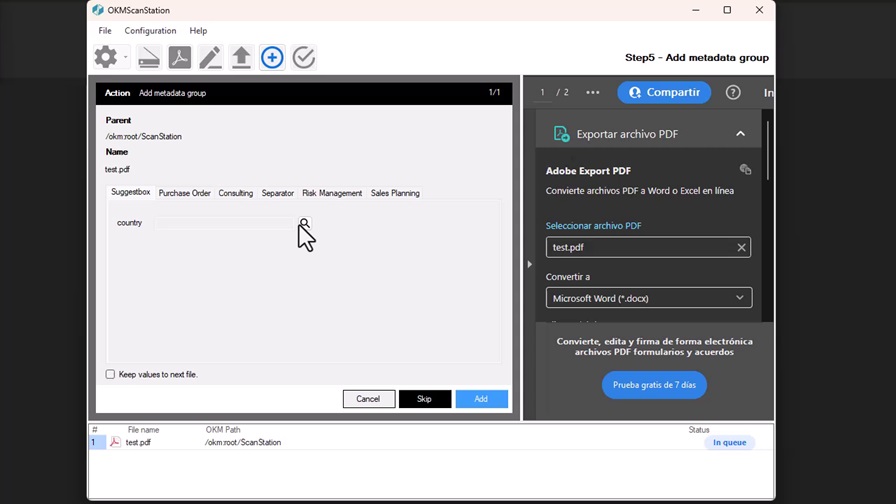
ScanStation improves status visibility and supports matrix-type metadata.
A More Consistent Experience Across the OpenKM Ecosystem
Other applications, such as DigitalSignatureClient and OKMEncryption, also feature a redesigned interface and use the new navigation dialog when accessing the document repository.
Tools such as OKMPrinter, HotFolder, and LiveEdit have improved visuals for lists, tables, and informational elements, making them easier to use.
The result is a more consistent, up-to-date set of applications that preserves familiar workflows while improving presentation and usability.
An Update Designed to Improve Efficiency and Document Productivity
The overhaul of OpenKM applications for Windows addresses an increasingly common business need: managing larger document repositories without letting the volume of information compromise the user experience.
Paginated navigation, search, filters, on-demand loading, and a refreshed interface work together to reduce unnecessary operations and make documents and folders easier to find.
Therefore, OpenKM 8.2.9 is more than a visual update. Where repository size may affect performance, the new version changes how applications retrieve and present information.
The new applications use OpenKM SDK .NET 5.8.0 and require a compatible OpenKM 8.2.9 server.
Although updating the existing desktop tools is not mandatory, the new installers for OpenKM 8.2.x are available at download.openkm.com.
With this update, OpenKM moves toward a more modern, responsive document management environment for Windows, built to handle large volumes of information.
Integration with Microsoft Word, Excel, PowerPoint, and Outlook keeps document management connected to the tools businesses use every day, supporting a more efficient working experience.
Want to improve your company’s document management and work more efficiently with Microsoft Office and Windows?Discover how OpenKM can help you organize, find, and manage documents from a centralized platform.
Request an OpenKM Demo
Hubungi kami
Pertanyaan umum
JBA Solutions Sdn Bhd
-
-
E-mel

-
Waktu pejabat
Isnin - Jumaat: 08:00 pagi - 12:00 petang, 13:00 petang - 17:00 petang GMT+8 untuk bantuan segera. Masa sekarang ialah hari Sabtu 06:39 am di Kuching, Sarawak, Malaysia.
-
Ibu pejabat
BT36, Level 7, Block B1, Icom Square, Jalan Pending, 93450 Kuching, Sarawak, Malaysia.
-
OpenKM di seluruh dunia
Afrika Utara: www.openkm.me
Amerika Syarikat: www.openkm.us
Brazil: www.openkm.com.br
Ecuador: www.openkm.ec
Hungary: www.openkm.hu
Indonesia: www.openkm.id
Itali: www.openkm.it
Jerman: www.openkm.de
Malaysia: www.openkm.my
México: www.openkm-mexico.com
Paraguay: www.openkm.com.py
Perancis: www.openkm.fr
Poland: www.openkm.pl
Portugal: www.openkm.pt
Romania: www.openkm.ro
Sepanyol: www.openkm.com
Serbia: www.openkm.rs
Timur Tengah: www.openkm.me
Keutamaan kuki
Sangat diperlukan Diperlukan untuk fungsi laman web. Ia tidak boleh dinyahaktifkan.
Analitik Membantu kami memahami cara pelawat berinteraksi dengan laman web.
Pemasaran Digunakan untuk memaparkan iklan yang relevan dan menjejak kempen.